Build workflows visually and execute them on real Android devices - no scripts, no manual effort, no limits.
Teams waste weeks building fragile custom scripts just to automate a few taps on a phone. There is no standard, scalable, cloud-native way to do it.
ADB, emulators, USB connections - every environment is different and breaks constantly.
Custom Python or bash scripts are fragile, hard to read, and impossible to maintain at scale.
Triggering tasks remotely on Android fleets requires custom infrastructure every time.
No servers to manage, nothing to babysit. Here's the whole journey, start to finish.
AndroMate Studio is a visual, node-based workflow builder. Drag actions, connect them, hit Run - your Android device does the rest.
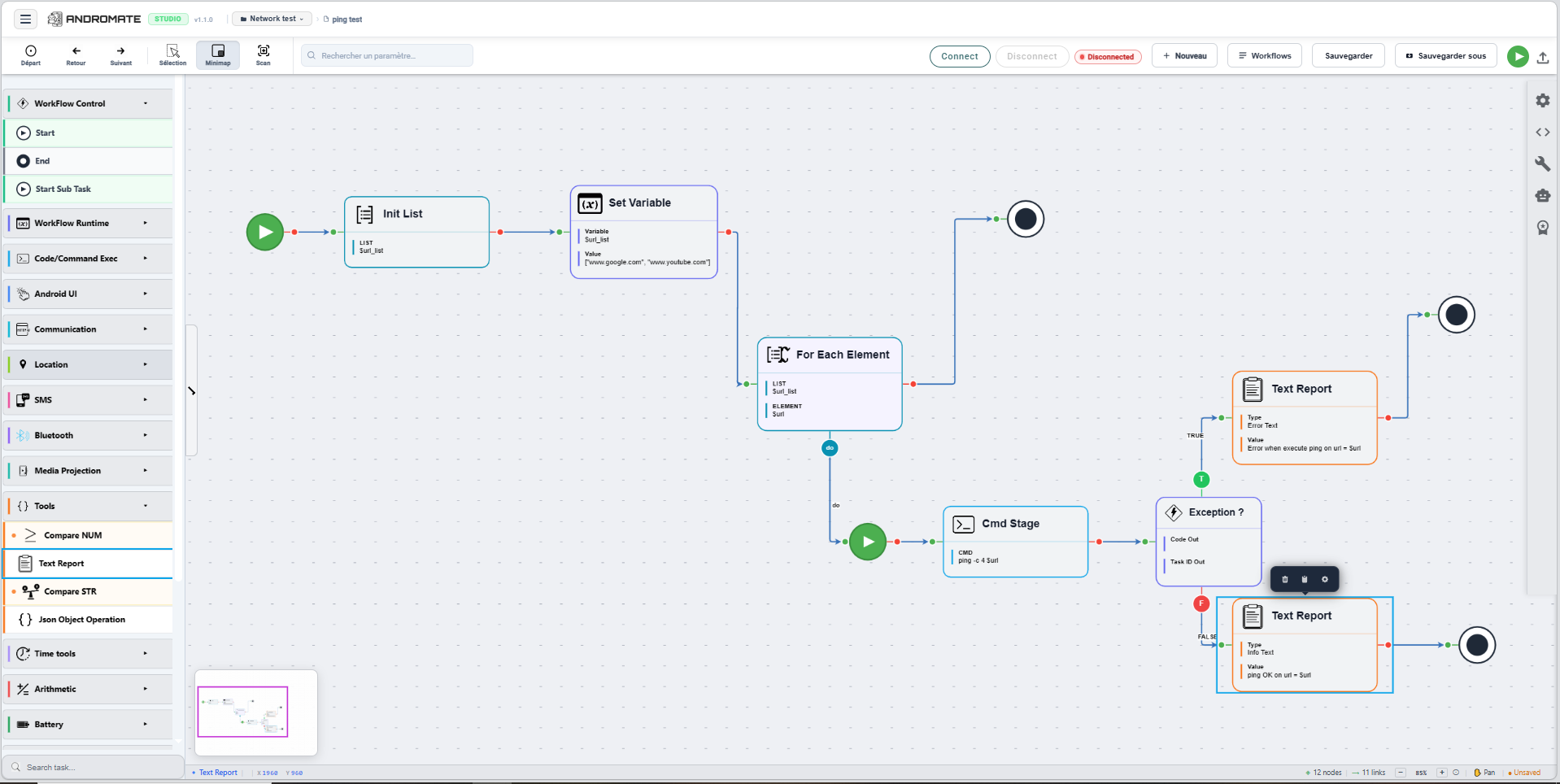
ping -c 4 $urlReference live Android device data directly inside any task field. AML variables are resolved at runtime on the device - no hardcoding, no custom scripts.
Drag actions from the sidebar, connect them with links, and build any automation flow visually - no code required.
Bluetooth, SMS, Location, Android UI, HTTP requests, OCR, benchmarks - everything you need is already in the action library.
Add Exception nodes, TRUE/FALSE branches, and variable management to build intelligent, adaptive automations.
Everything you need to run Android automation at scale. Build jobs, attach visual workflows, set parameters and watch your fleet of devices execute in real time.
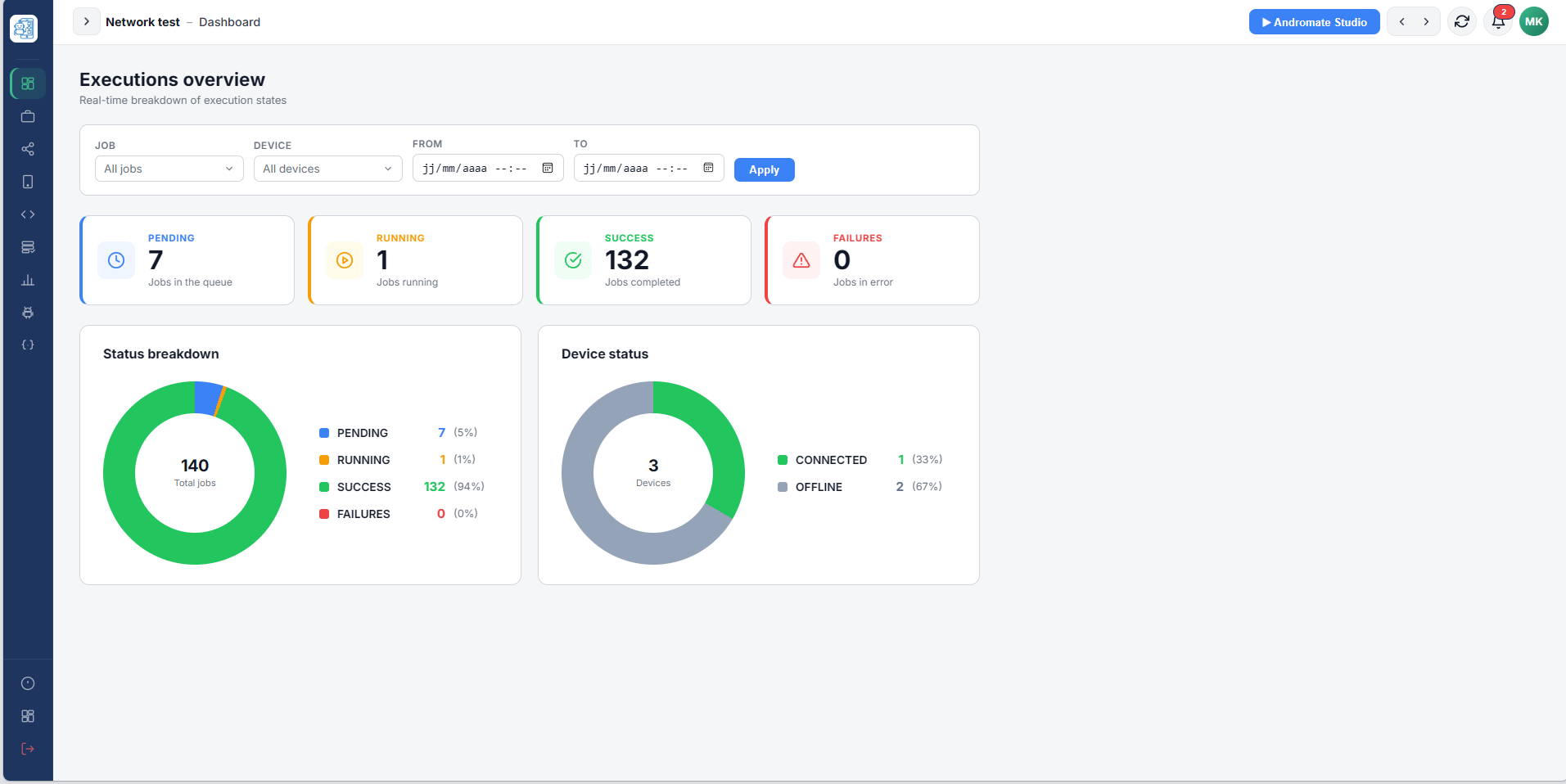
Every job, every device, one glance. Pending, running, succeeded and failed counts update live, right alongside which devices are currently connected - so you always know the state of your fleet.
Create a job in seconds. Name it, describe it, set its parameters, choose target devices and attach the right workflow - all from one form.
Design automation logic visually - no scripting needed. Drag nodes, connect steps, add conditions and loops. Deploy to any device instantly.
Monitor every robot in real time. See task progress, execution status and full logs - pause, retry or stop any agent from the dashboard.
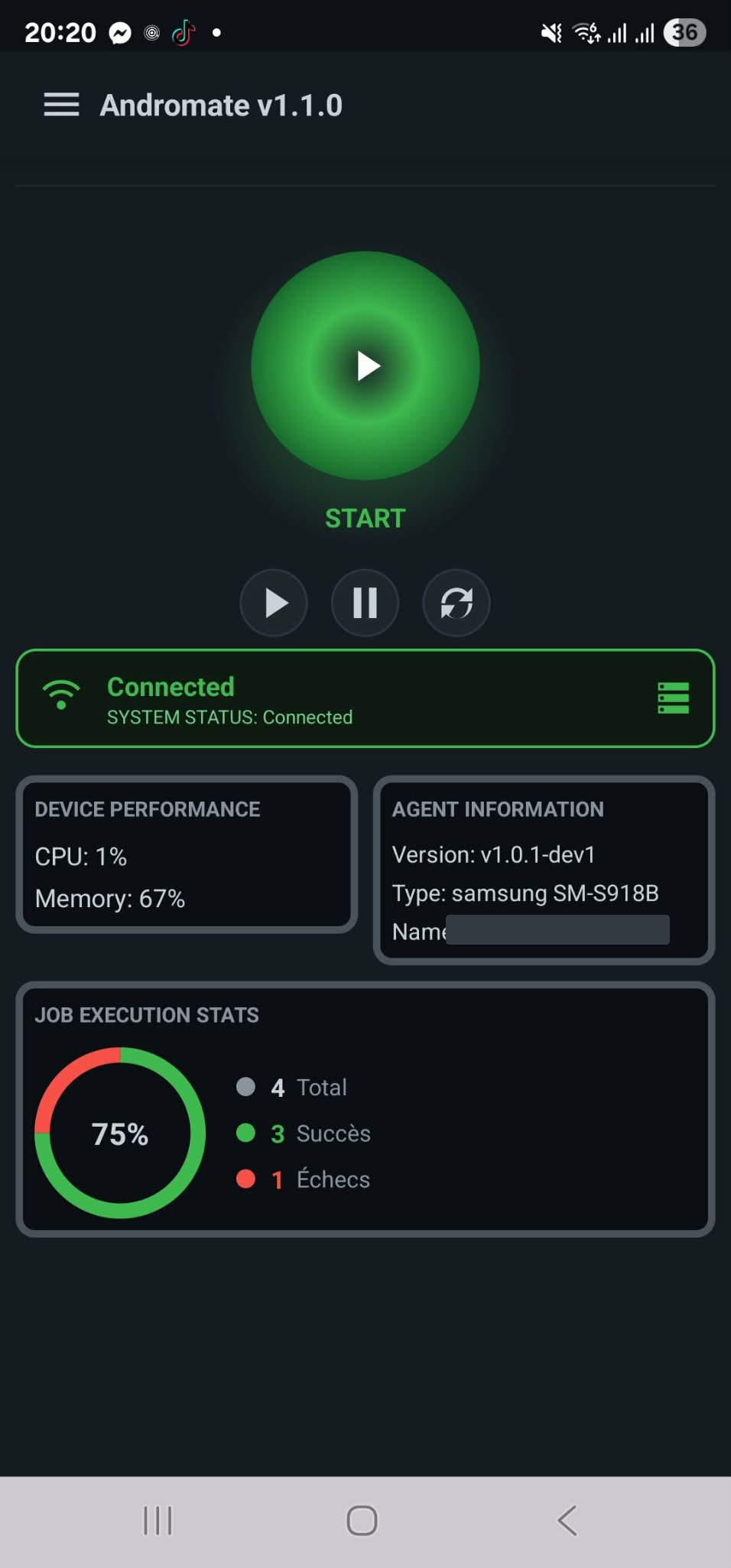
The AndroMate Android agent runs silently on your devices. It receives jobs from the backoffice, loads the attached workflow, and executes every action - taps, swipes, inputs - exactly as designed.
Trigger jobs, check status and pull results straight from your own tools. AndroMate exposes a simple REST API, secured with scoped API keys.
await fetch("https://cloud.andromate.io/api/v1/jobs/ping_test/trigger", {
  method: "GET",
  headers: { "Authorization": "Bearer YOUR_API_KEY" }
})
Every task, every parameter, every output - fully documented with descriptions, compatibility tables, exception handling and a visual flowchart of the execution logic. Read the documentation.
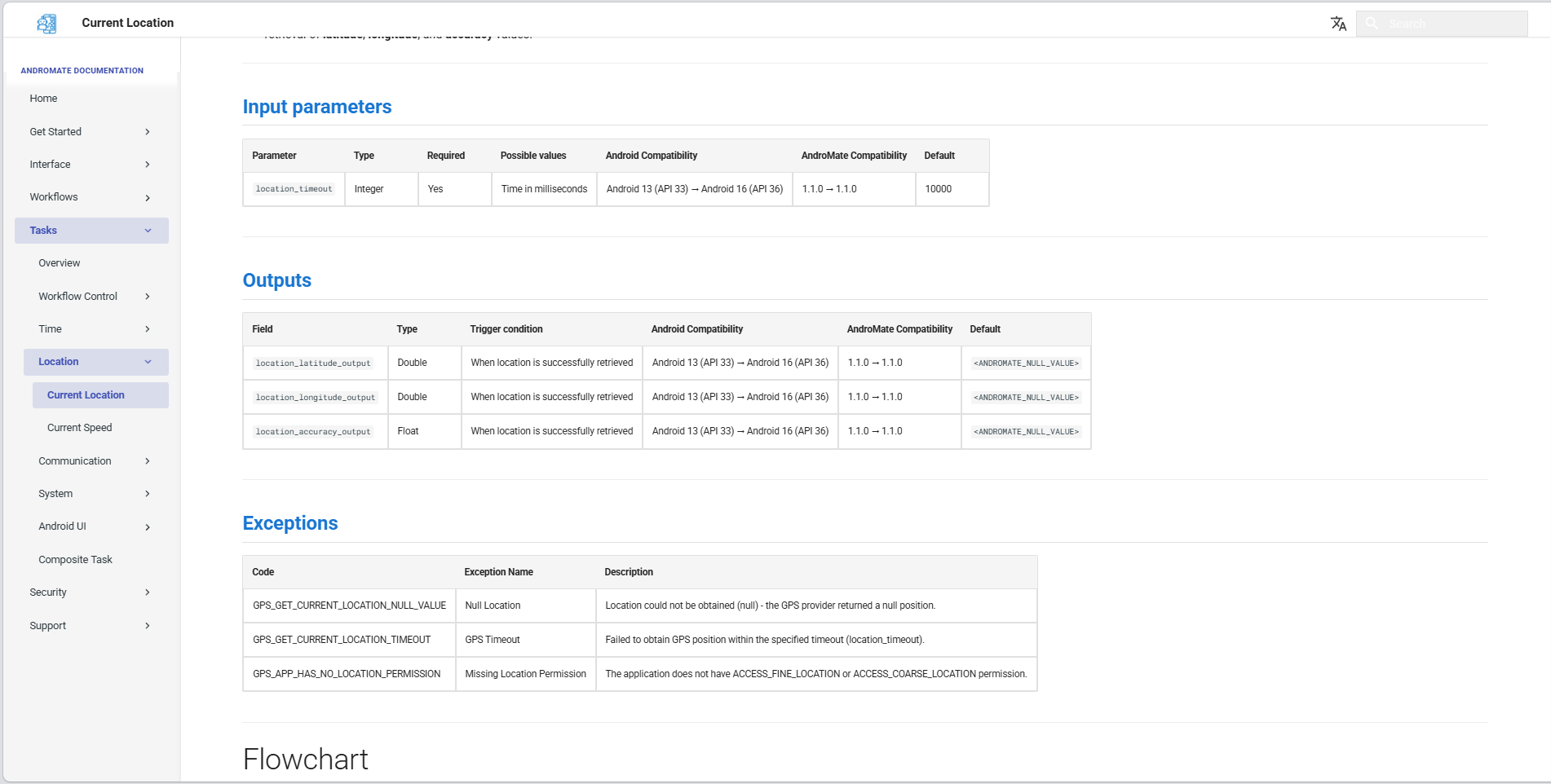
Input parameters, output fields and exception codes - all in one structured table with Android version compatibility.
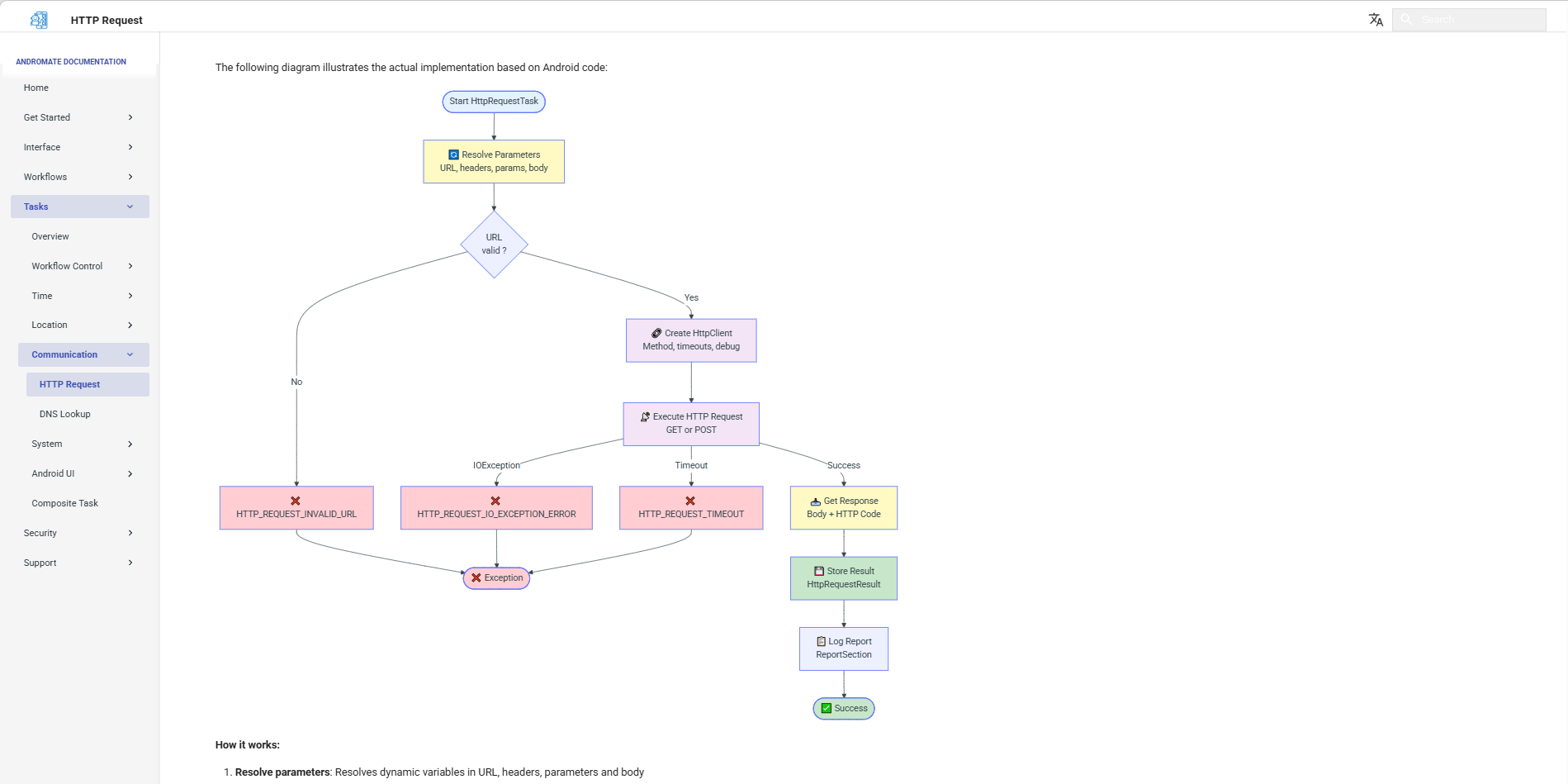
A visual flowchart for every task shows the full execution path - conditions, branches, retries and final outputs.
One platform. Powerful enough for engineers, simple enough for any team.
Build automation flows with a drag-and-drop node interface. No scripting required.
Our Android app runs directly on your device as a native agent - deeply integrated with the OS for real gestures, real UI interactions, and real app control. Once installed, it connects to the cloud, waits for your workflows, and executes them instantly on the device.
Accessibility-based automation for the messaging apps you actually use - real conversations, not just generic taps and swipes.
Schedule workflows to run at any time, on repeat, or triggered by external events.
Detailed run history, success rates, screenshots, and exportable reports for every workflow.
Atlas is our intelligent AI agent that understands your goals, generates workflows automatically, and suggests corrections when a workflow fails - giving you full control over what gets fixed.
Full developer docs, guides, API references, and workflow examples to help you get started and go further.
Whether you're running QA on a single app or managing hundreds of Android devices, AndroMate scales with you.
Automate repetitive test scenarios and run them in parallel across real devices - no scripts, with logs and regressions tracked automatically.
Integrate Android workflows into your deployment and monitoring pipelines.
Centrally control, configure, and automate tasks across dozens of devices.
Build custom Android workflows for business processes - data entry, notifications, monitoring, and beyond.
Everything you need to know before joining the waitlist. Can't find your answer? Reach out.
AndroMate requires a minimum SDK of 33 - Android 13 and above - on real physical devices, no emulators required.
Samsung devices are 100% supported today. We're actively working on adding support for Xiaomi and Google Pixel.
We're currently working on WhatsApp, Google Messages and Telegram. More apps are added as we grow - the goal is to eventually automate as many Android apps as possible.
60 tasks today. We plan to reach 200 by 2027, and long-term we want to cover the full Android SDK.
No. AndroMate Studio is a visual, node-based builder - drag actions, connect them, hit Run. If you prefer code, the REST API lets you trigger and manage jobs directly from your own scripts.
Every device connection is authenticated, and every API call is scoped to a key you control. Nothing runs on a device without a job explicitly triggered from your account.
No - not even AndroMate admins. Each client has their own signature, saved securely in our system, and a job sent to your device is only accepted if that signature is valid. Job execution stays fully scoped to your account.
Yes. The AndroMate API lets you trigger jobs, check their status and pull results from your own scripts, CI pipeline or backend - see the API and Docs sections.
As many as your plan allows - from a handful of devices for a QA team to a full fleet for production-scale automation.
AndroMate runs from the cloud by default. The lightweight Android agent runs locally on each device and receives jobs remotely - no manual intervention needed.
No code and no fragile selectors to maintain. You build a workflow once, visually, and run it reliably across your whole device fleet - with logs and results built in.
AndroMate is launching in 2027. Join the waitlist below to get early access and updates as we get closer.
Have a question, found a bug, or want to suggest a feature? We'd love to hear from you - pick whichever channel works best.
Have a feature request, a question, or a suggestion? Open an issue directly on GitHub - it's the fastest way to track it.
Open a GitHub Issue → View all issues on GitHubPrefer email? Reach us directly at support@andromate.net - we reply to every message.
Email support@andromate.net → We typically respond within 48 hoursComing in 2027.